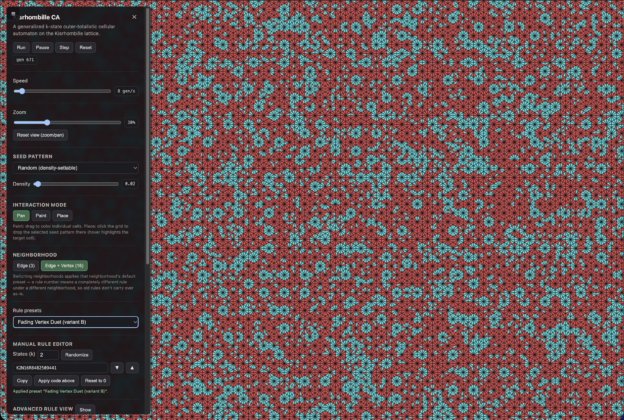
A few months ago I started wondering what cellular automata would look like on a more exotic lattice than the usual square or hexagonal grid. The result is tiling-patterns — a fully interactive, GPU-accelerated cellular automaton running on the Kisrhombille tiling, with a searchable rule space and over 130 hand-curated presets that produce genuinely strange and beautiful long-run dynamics. The live demo runs in the browser with no install required.
What is the Kisrhombille tiling?
The Kisrhombille tessellation is one of the more elegant tilings in Euclidean geometry. Start with a regular hexagon and divide it into twelve congruent 30-60-90 right triangles — six pairs arranged around the center, each pair sharing its hypotenuse. Tile the plane with hexagons and you get the Kisrhombille: a sea of small right triangles, each one a fundamental domain of the Euclidean (2,3,6) triangle group. The name comes from John Conway: “kis” is the Conway notation for raising a center point over each face, applied to the rhombille tiling. The Kisrhombille is also the dual of the truncated trihexagonal tiling, with face configuration V4.6.12.
Because of the (2,3,6) symmetry group, every triangle in the tiling can be located by domain-folding — reflecting a coordinate across the group’s mirror lines until it lands in the fundamental domain. This means you can identify any cell by its position without storing an explicit mesh: the geometry is implicit, derived on the fly from the symmetry group’s reflections. The implementation exploits this directly — no triangle list is stored. Instead, a 512×512-hexagon toroidal grid (each hexagon subdivided into 12 triangles, for roughly 3.1 million cells total) lives in GPU texture memory, and each cell’s neighborhood is computed by the shader using the domain-folding formula.
The cellular automaton
The rule is a generalized outer-totalistic cellular automaton. Each cell holds one of k states (selectable from 2 up to 9). Each generation, a cell’s next state is determined by its current state and the sum of its neighbors’ states — not by which specific neighbor holds which state, just the total. This is the outer-totalistic structure: the rule depends on the cell’s own state (outer) and the neighborhood sum (totalistic), not the full neighborhood configuration. Stephen Wolfram’s A New Kind of Science (2002) explored outer-totalistic rules on triangular lattices, Penrose tilings, and other non-standard substrates, each rule “specified by an outer-totalistic code number” — the same encoding I use here, adapted to the Kisrhombille geometry.
Two neighborhood sizes are supported and can be toggled live:
- 3-neighbor mode: each triangle’s three edge-sharing neighbors — the natural tight neighborhood of the lattice.
- 16-neighbor mode: the three edge-sharers plus thirteen additional vertex-sharing (but not edge-sharing) neighbors — an extended neighborhood that mixes information across a larger range each step.
Importantly, the same rule number means completely different things under the two neighborhood modes, since the number of possible neighborhood sums differs. Switching neighborhoods applies that neighborhood’s own default preset rather than reinterpreting the current rule. Rules are shareable as compact codes of the form K<states>N<neighbors>R<number> — for example, the app’s startup rule is K2N16R207368.
The entire simulation runs on the GPU via WebGL2: each generation is a fragment shader pass over the texture array, reading neighbor states and writing the new state. On a modern desktop GPU this is fast enough to run at interactive speeds at the full 3.1-million-cell resolution.
The goldilocks problem
The rule space is enormous. Even for binary (2-state) rules, the number of distinct outer-totalistic rules grows quickly with neighborhood size. Most rules in that space are uninteresting: they either freeze almost immediately into a static mosaic or dissolve into featureless noise. The interesting rules live in the middle — what I call the “goldilocks” zone. A goldilocks rule settles into a genuine dynamic equilibrium: not frozen, not chaotic, but persistently active at some stable nonzero level, often with visually coherent structure that keeps reforming and drifting rather than dying out or washing away.
Finding these rules required a search. The Python package in the repository (src/tiling_patterns/) implements the same outer-totalistic rule semantics as the WebGL shader at CPU speed, making it practical to evaluate thousands of random rules and track their long-run activity. A “settled activity” metric — the fraction of cells changing state per generation, measured after the initial transient — cleanly separates the three cases: near-zero means frozen, near-one means chaos, and a stable nonzero plateau in between is the goldilocks signal. Rules that passed the automated filter were then watched by hand for hundreds of generations in the browser before being added to the preset list, to make sure the long-run character was genuinely interesting and not just a promising first few frames.
The 16-neighbor goldilocks basin turned out to be much narrower than the 3-neighbor one: only about 3 in 1,200 random binary 16-neighbor trials produced a genuinely stable living equilibrium. That scarcity is part of what makes the curated presets worth having — they represent a real search through a mostly-barren landscape.
What you see: 103 presets (and 30 more)
The app ships with 103 hand-vetted 16-neighbor presets and 30 3-neighbor presets — each watched for hundreds of generations and picked for interesting long-run behavior, not just an eye-catching first impression. A few highlights:
- Glider Fronts (sparser, default) — the app’s startup rule (
K2N16R207368). A sparse binary field where small traveling structures drift and interact against a mostly-quiet background. Individual gliders are visually trackable; the field never settles. - Vertex Duet — the liveliest 16-neighbor rule: dense, sharply-defined pinwheel rosettes packed edge-to-edge, with settled activity holding flat at ~40% of cells changing per generation from generation 100 through at least generation 400.
- Living Bloom Field — the 3-neighbor default. Rosette-like blooms that keep gently drifting on a calm background; 63% of its single-entry rule-table mutations land in the same goldilocks class, making it an unusually robust basin.
- Roiling Mosaic — the most turbulent 3-neighbor rule: ~59% of cells changing per generation with near-maximal color diversity (94% of maximum entropy), a dense all-over churn rather than distinct structures.
- Pulsing Rosettes — moderate activity but the highest activity variance of the curated rules, visibly pulsing between calmer and busier stretches rather than holding one steady level.
The preset characterizations in web/js/presets.js each include settled activity level, color diversity (as a fraction of maximum Shannon entropy), and a description of the visual character — useful for choosing a preset that matches the kind of dynamic you want to watch.
Rule exploration tools
The app isn’t just a preset viewer — it’s designed for exploration. The rule editor lets you paste or copy a rule code, randomize to a new rule, or increment and decrement through the rule space one entry at a time (holding the button accelerates the step size for large jumps). An “advanced rule view” breaks the transition table out one row per color, showing each row’s stasis/advance/retreat/other transition breakdown as a bar. Individual rows can be pinned (frozen while the rest randomize), nudged cyclically, or reset to zero — useful for methodically finding the critical point where a single color’s behavior tips from frozen to living.
Fifteen seed patterns are available: density-settable random fills (from an ultra-sparse 0.05% scatter up to dense), a random island, and several symmetric multi-color seeds — rings, spirals, sector wheels, twin blooms, checkerboards, single-cell and single-hexagon seeds. Most are click-to-place, so you can drop several at different locations before running. The symmetric seeds are particularly useful for rules with three or more colors, where the extra structure makes the color dynamics much easier to read.
A note on novelty
The Kisrhombille tiling is well-studied geometrically. Recent papers by Kablan, Vízvári, and Nagy (Acta Crystallographica A, 2024 and 2025) derived digital-distance formulas for it, independently distinguishing the same edge-only and edge-plus-vertex neighborhoods this project uses — but for shortest-path distance, not evolving automaton states. The same group has studied cellular automaton dynamics on the related plain triangular grid. As far as I could determine from a thorough literature search, no prior published work runs a generation-by-generation cellular automaton on the Kisrhombille tiling itself. The rule codes in the preset list were not drawn from any existing catalog — there wasn’t one.
Try it
Live demo → novaspivack.github.io/tiling-patterns
A few tips for getting started:
- The app starts in 16-neighbor mode with “Glider Fronts.” Switch to 3-neighbor mode to see the Living Bloom Field — a noticeably different character.
- For rules with 3 or more colors, try the symmetric seed patterns (rings, spirals, sector wheels) rather than plain random fill — the color dynamics read much more clearly against a structured start.
- 30% zoom at higher speeds is a good combination for watching a rule’s long-run character rather than individual cells.
- Rules that look like noise at low speed often resolve into a clear strobe or pulse at higher speeds — worth bumping the speed slider before concluding a rule isn’t interesting.
- The live activity/entropy stats graph shows whether a rule has settled (flat line) or is still evolving — useful when exploring rules you find via Randomize.
The full source is on GitHub at github.com/novaspivack/tiling-patterns — the WebGL shader, the Python rule-search tools, and the complete preset list with characterizations are all there. The project is licensed under PolyForm Noncommercial 1.0.0.